
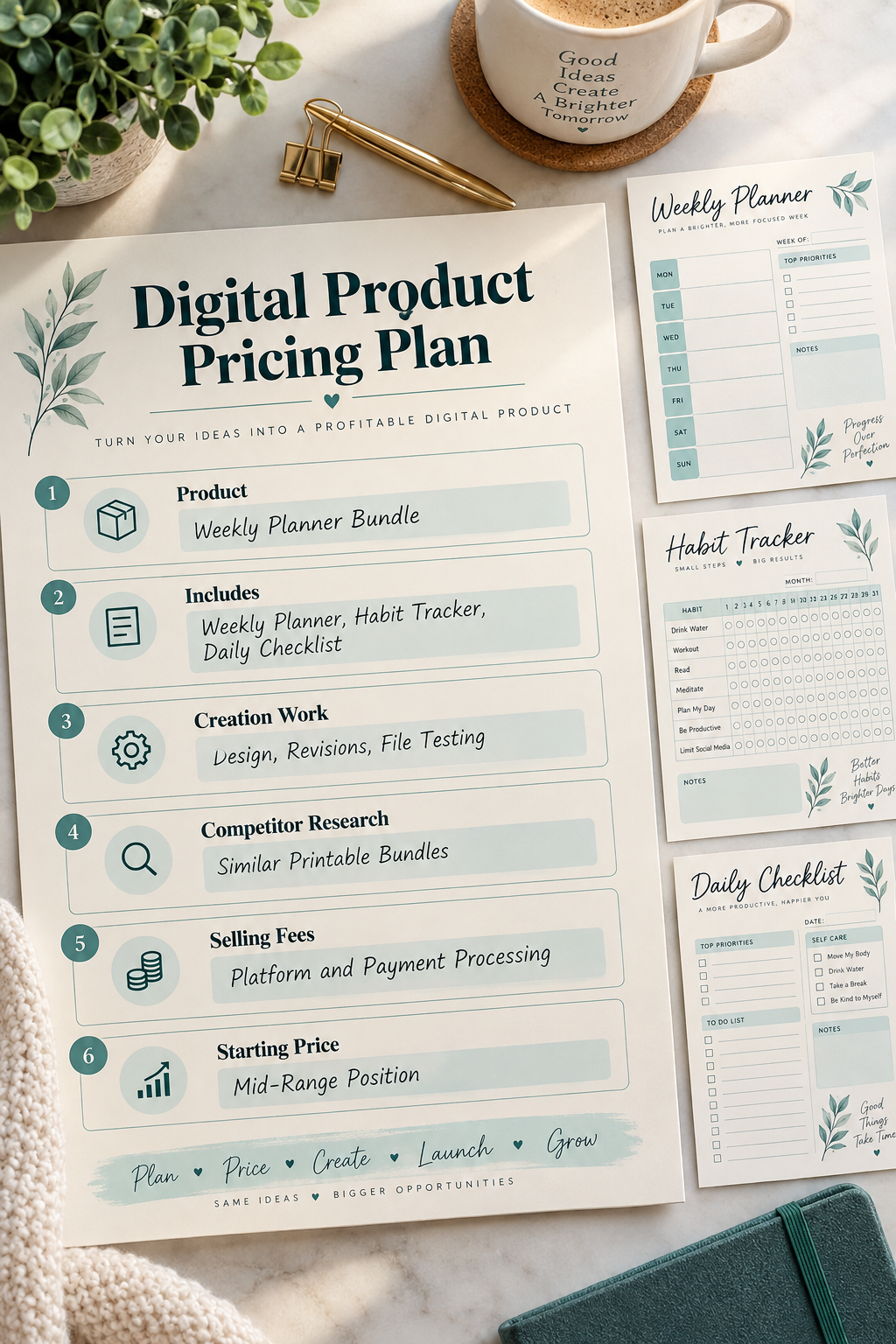
Pricing a digital product can feel harder than making it. You finish a printable planner, Canva template, or digital download, then get stuck on one question: What should you charge for it?
Many beginners look at other sellers and copy a price that seems reasonable. Others choose the lowest price they can think of, hoping it will attract buyers. Neither approach tells you whether your price makes sense for what you’re selling.
Learning how to price digital products starts with understanding what you’ve made, how much work went into it, and what buyers actually receive. You also need to think about selling fees and the differences between a simple download and a larger bundle.
You don’t need complicated spreadsheets or business experience to get started. A notebook or basic worksheet is enough to work through the decisions.
These eight steps will help you choose a starting price, avoid common beginner mistakes, and know when to review it later. The goal isn’t to find one magic number. It’s to make a pricing decision you understand.
1. Write Down Exactly What Your Digital Product Includes
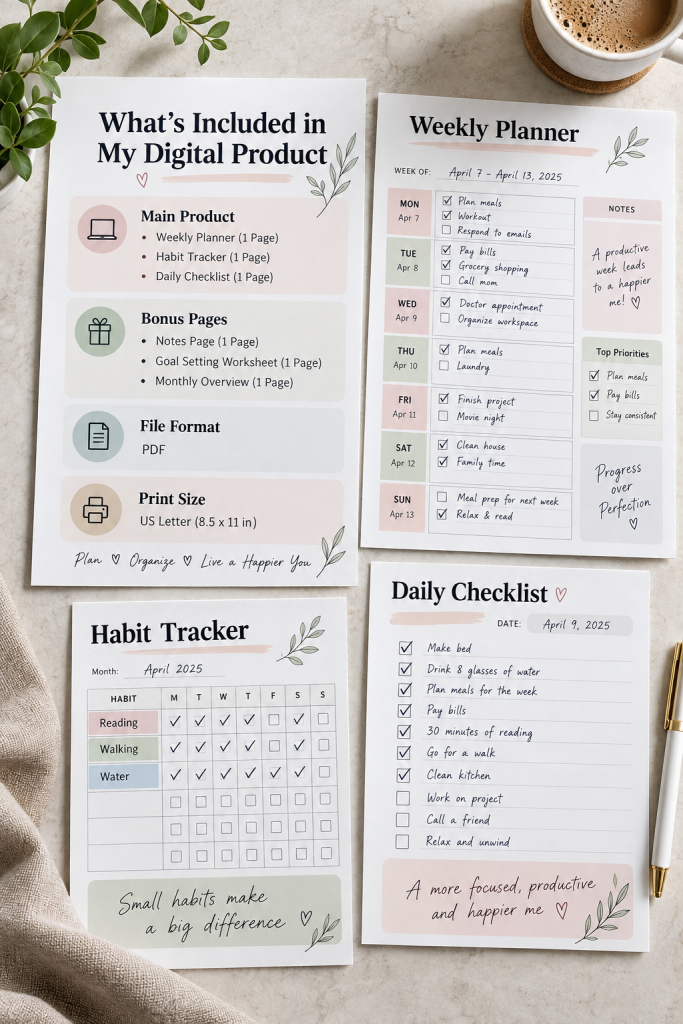
Before choosing a price, make a clear list of everything your customer will receive.
A weekly planner and a full planning bundle are different products, even if they have similar designs. Count the actual pages, templates, and useful features instead of judging the product by its cover.
Make a Simple Product Inventory
Write down:
- Main product: A weekly planner with spaces for tasks and appointments.
- Extra pages: A habit tracker and daily checklist.
- File formats: The actual downloadable formats included.
- Special features: Editable sections, linked pages, or print-friendly versions.
Don’t describe a file as editable unless the buyer can actually edit it.
The mistake to avoid is setting a price before you’ve decided exactly what the customer is buying.
2. Track the Time and Expenses Needed to Create It
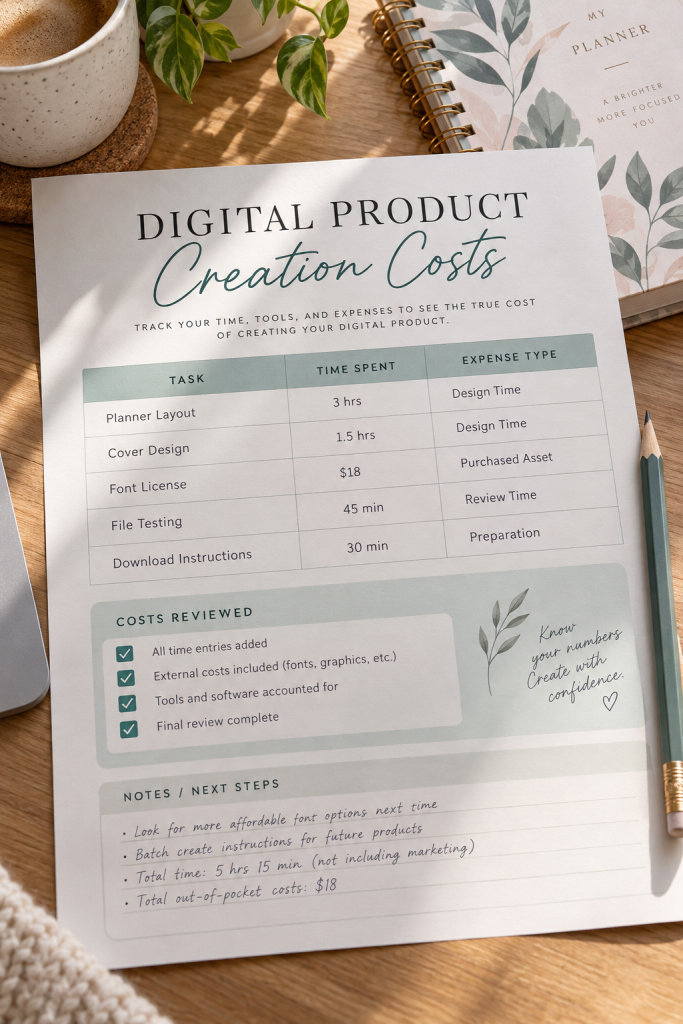
A digital download may cost little to deliver, but creating it still takes work.
Start a simple worksheet for the time and expenses involved. Include designing pages, checking spelling, testing files, and preparing the final download.
What Should You Record?
Keep a note of the software, templates, fonts, or graphics you paid for. If you use a monthly design tool for several products, don’t automatically charge its entire subscription cost to one download.
Also record how long the main tasks take. Your time matters, even when you work from home.
Avoid the common mistake of counting only the money spent on tools. Your records can help you understand your costs, although they don’t automatically determine what customers will pay.
Your Product Cost Checklist
3. Compare Listings That Offer the Same Kind of Product

Looking at similar digital products can give you useful pricing context, but the details matter.
Search for products that solve the same problem as yours. If you’re selling a printable budget planner, compare it with other printable budget planners rather than large financial planning bundles.
Check More Than the Listed Price
Create a small comparison sheet covering:
- Number and type of included pages.
- Printable or editable format.
- Instructions and extra resources.
- Regular listing price and any temporary discount.
Pay attention to what each buyer receives. A product with many decorative pages may not offer the same practical value as one with fewer, more useful pages.
Don’t copy the cheapest listing simply because it’s cheap. Use comparable products to understand the choices available to buyers.
Compare products that solve the same problem.
Check included pages, formats, and editing options.
Separate regular prices from temporary discounts.
Comparing a single worksheet with a large bundle.
Treating page count as the only sign of value.
Copying another seller’s price without checking the contents.
4. Identify the Features That Make Your Product More Useful
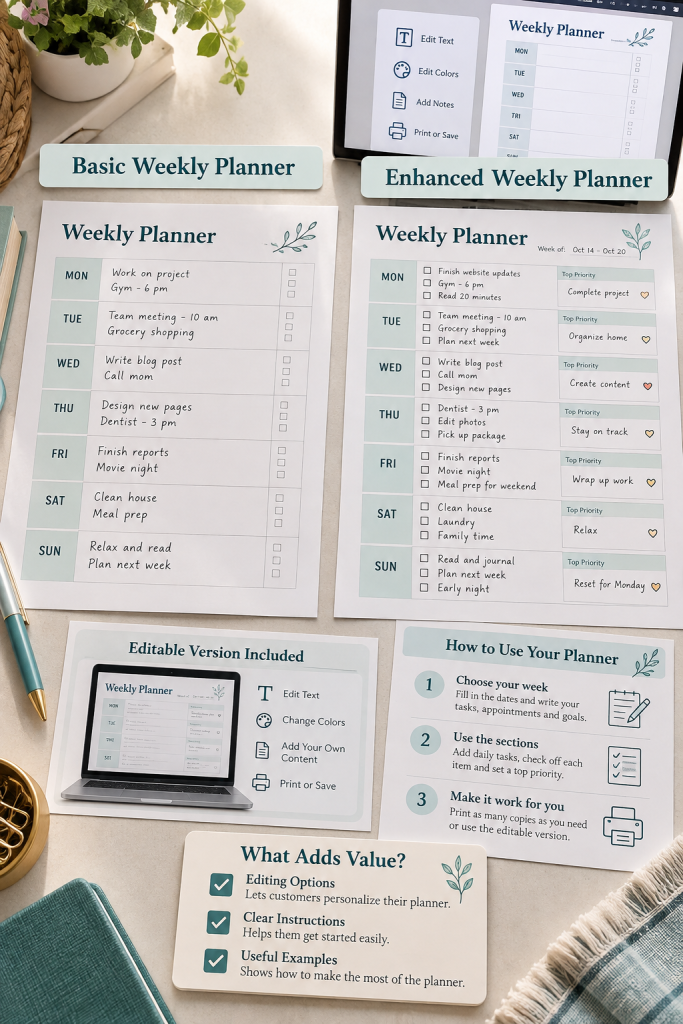
A useful digital product doesn’t have to be large or complicated.
Think about what makes your download easier for a buyer to use. A planner with clear labels, enough writing space, and simple instructions may be more practical than one packed with decorative pages.
Look at the Buyer’s Experience
For example, compare a basic weekly planner with one that also includes an editable version, helpful instructions, and a filled sample page.
These features may give buyers more flexibility, provided they actually need them.
Write down the benefits your product offers, then explain those benefits clearly in the listing.
The mistake is assuming that adding more pages, colors, or decorations automatically justifies a higher price. Focus on real usefulness rather than extra content.
| Basic Weekly Planner | Planner With Added Features |
|---|---|
| Printable PDF pages | Printable and editable versions |
| Empty planning sections | Planning sections with a completed example |
| Downloadable file only | Downloadable file with simple instructions |
5. Check Marketplace Fees Before Choosing Your Price
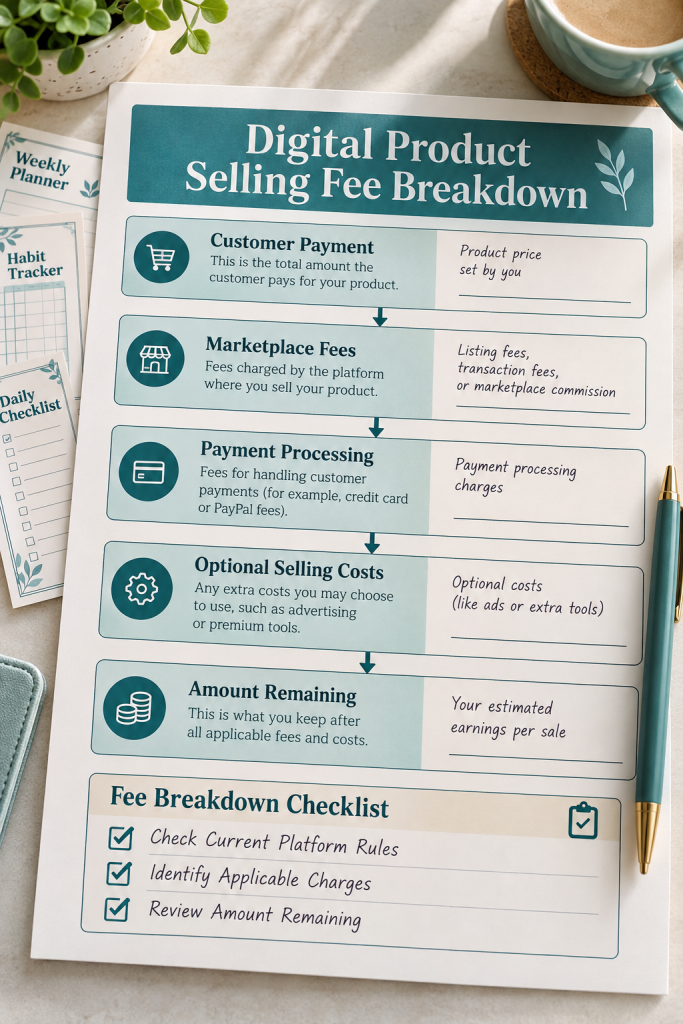
The amount a customer pays isn’t always the amount you keep.
Platforms such as Etsy and online store providers may charge fees for listing products, processing payments, or handling transactions. The exact charges depend on the platform, payment method, and other details.
Make a Simple Fee Breakdown
Before deciding on your price, check the platform’s current official fee information.
Record the charges that apply to your product, including any payment processing or optional selling costs. Then work out what would remain from a sale after those charges.
Be careful with older tutorials because platform fees and policies can change.
The common mistake is treating the full selling price as money you keep. A quick fee check helps you make a more informed decision.
6. Choose a Starting Price You Can Explain
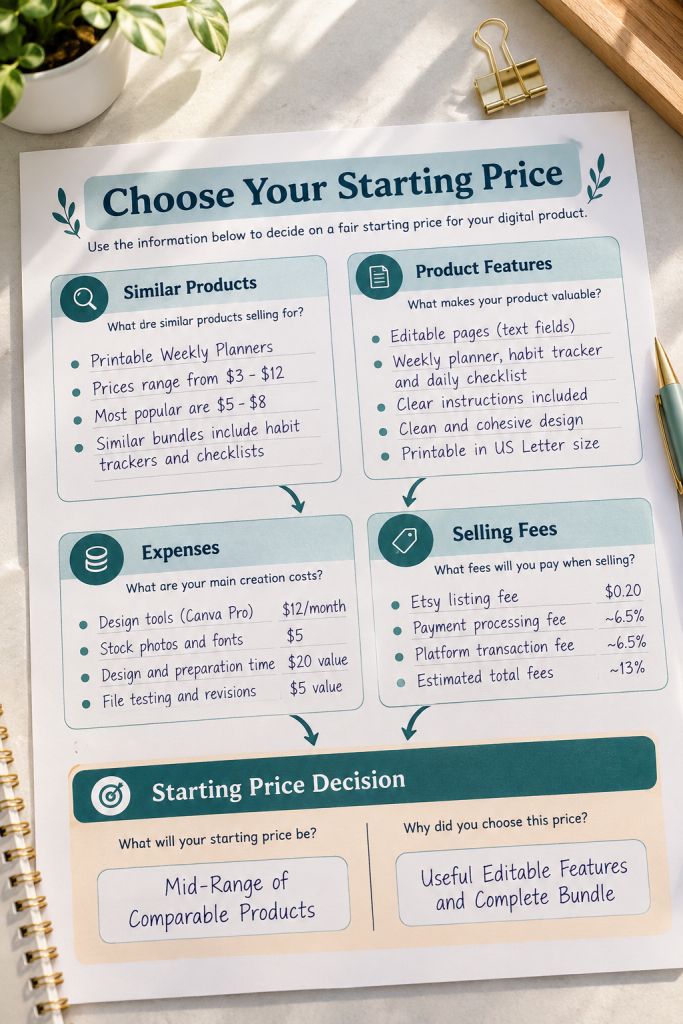
Now you have enough information to make your first pricing decision.
Bring together your product inventory, creation costs, comparable listings, useful features, and selling fees. Look at the full picture rather than choosing a number that simply feels right.
Put Your Research Into One Decision
Start with the prices of genuinely comparable products. Consider whether yours offers fewer, similar, or more useful features.
Next, check whether your proposed price makes sense after the applicable fees. Keep your creation costs in mind, but remember that spending more time on a product doesn’t automatically make it more valuable to buyers.
Write down your chosen starting price and the reasons behind it.
Avoid changing the number just because another seller charges less. Your decision should have a clear basis.
Your Starting Price Checklist
Compare: Find the usual asking-price range for similar downloads.
Adjust: Account for differences in useful features and contents.
Check: Review your expenses and the amount left after selling fees.
Decide: Record one starting price and why you chose it.
7. Set Separate Prices for Single Downloads and Bundles

A single printable and a bundle of related printables should be treated as different offers.
For example, a weekly planner might be sold on its own. You could also offer a planning bundle that includes the weekly planner, habit tracker, goal-setting sheet, and daily checklist.
Decide What the Bundle Adds
List the individual products and check their separate prices. Then consider a bundle price that gives buyers a clear reason to choose the collection.
The bundle should offer something useful, such as a coordinated set of tools for the same planning task.
Don’t assume every bundle needs a large discount. The contents and total value matter more than making the discount look impressive.
Avoid combining unrelated files simply to create a bigger product.
Weekly Planner
One focused planning product for buyers who only need a weekly schedule.
Complete Planning Set
Weekly planner, habit tracker, goal sheet, and daily checklist.
Pricing check: Compare the bundle offer with the individual products.
8. Review Your Price After Your Listing Goes Live

Your first price doesn’t have to be your final price.
Once your listing is live, give yourself time to observe how people respond. Keep simple notes about listing visits, purchases, customer questions, and any feedback you receive.
Review the Whole Listing
If people visit but don’t buy, price might be one reason. However, unclear preview images, confusing descriptions, or a product that doesn’t match buyers’ needs could also be involved.
Look for patterns instead of reacting to a single day.
You can improve the listing photos, explain the included files more clearly, or adjust your product before changing its price.
The mistake to avoid is repeatedly lowering your price without understanding the problem. Make one thoughtful change at a time so you can judge what helps.
💡 Quick Tip: Review Before You Reprice
Check your listing visits, purchases, preview images, product description, and buyer questions together.
⚠️ Watch Out
Few or no sales do not automatically mean your product is overpriced. Check whether buyers understand what they are getting before making a price change.
Start With a Price That Makes Sense
You don’t need to guess or copy other sellers to decide what to charge for your first digital download.
Learning how to price digital products becomes easier when you break the decision into smaller steps. Know what your product includes, understand your costs, compare similar offers, and check the fees before setting a starting price.
Once your listing is published, use what you learn to make thoughtful changes. A clear description and useful product matter just as much as the number on the price tag.Save this guide to your Pinterest board so you can come back to the steps whenever you’re pricing a new printable, templ