

It is 8:47 on a Monday morning, and a project manager already has six browser tabs open. One holds meeting notes, another has a deadline that moved on Friday, and a third shows a calendar packed with calls. The tasks are not especially complicated. Finding the right information at the right moment is the hard part.
That everyday scramble is why small, focused organizers can be useful. For a creator, digital organization tools offer a chance to build products around one clear job instead of selling another large planner that asks buyers to change their whole routine. A tidy spreadsheet or an editable dashboard may be easier for a professional to adopt than a system with dozens of pages.
The ideas below cover daily focus, meeting follow ups, client setup, project tracking, and routine work. For each product, think about the person who will open it on a busy morning, the fields they really need, and what they can leave out. Keep sample entries fictional, and check the current selling platform rules before listing your download.
1. Daily Priority Dashboard With Three Main Tasks

A short daily dashboard gives a busy worker somewhere to put the few tasks that cannot drift. It suits team leads, assistants, and freelancers whose day often fills with small requests.
Build It Around Outcomes
Create a one-page Canva template or an editable Google Sheets tab. Put three priority rows at the top, with a space for the result needed, not just the task name. Add a separate area for interruptions so new requests do not push the main work off the page.
Show one filled example using fictional tasks, plus a clean blank copy. Leave enough white space for someone to check the page between calls.
2. Weekly Time Blocking Calendar Template
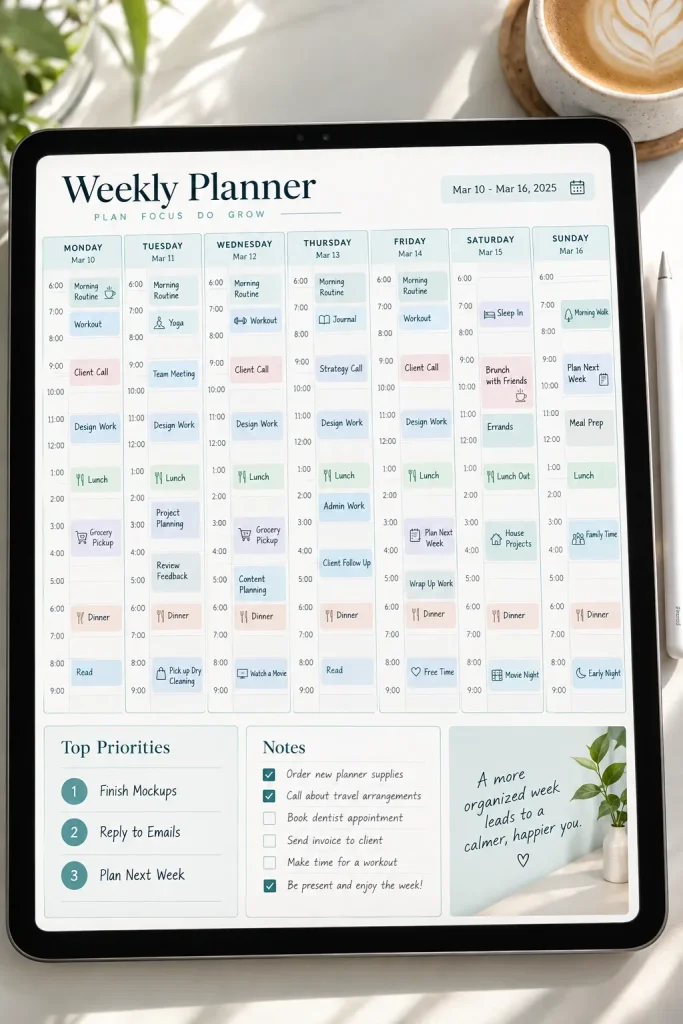
At 10 a.m., a free-looking morning can disappear under back-to-back calls. A time blocking template makes the week visible before those appointments land. This is useful for consultants, managers, and people balancing focused work with meetings.
Keep the Calendar Flexible
Build a Monday through Friday grid in Canva or Google Sheets. Use simple labels such as focused work, calls, admin, and buffer. Avoid filling every hour. Buyers need room for work that runs long or arrives unexpectedly.
Include a blank version and one fictional workweek so the color system is clear. Keep the printable version readable in black and white, too.
📅 Weekly Planner Layout Checklist
3. Meeting Agenda and Action Notes Bundle

Meeting notes can look complete while hiding who agreed to do what. By the next call, the important sentence is buried halfway down a page. A two-part bundle solves a narrow problem: preparing a meeting and recording what happens afterward. This product suits project leads and small client teams.
Set Up the Paired Pages
Create one editable agenda with the topic, decision needed, and planned discussion time. The second page holds decisions, action owners, due dates, and questions that remain open. Google Docs works for a simple copyable file, while Canva can make a printable version.
Include a filled sample so buyers can spot the difference between a discussion note and an assigned action.
Meeting note: Website update discussed.
No clear decision, no assigned owner, and no date to check progress.
Decision: Revise homepage layout.
Owner: Project lead.
Next check: Friday’s team meeting.
4. Client Onboarding Timeline Checklist

Start with the steps a new client must complete before work begins. A timeline checklist keeps setup requests in one place, which is useful for service providers, agencies, and freelance coordinators.
Make It Reusable
Use Google Docs or Canva to build a sequence with spaces for the client’s name, the person responsible, and the target date. Separate tasks your buyer completes from items the client needs to send. This prevents a missing login or unanswered questionnaire from looking like unfinished internal work.
Add a short welcome note and a blank checklist. Show a sample with fictional names and remove any real client details before selling.
Collect the Starting Details
Record the main contact, required files, access requests, and items still missing.
Confirm the Project Setup
Check the agreed scope, communication contact, and planned starting date.
Mark the Handoff Complete
Note who approved the setup and where the completed onboarding record is stored.
5. Project Milestone and Deliverable Tracker

An uncluttered row of milestones tells a clearer story than a long collection of to-do tasks. Each row should connect a delivery date to something the team can actually hand over. This format fits project coordinators, designers, and managers tracking work across people.
Keep the Sheet Easy to Scan
Create a Google Sheets or Excel file with fields for milestone, deliverable, owner, target date, blocker, and status. Add an optional filter view or simple status colors, but avoid making the sheet depend on complicated scripts.
Include a separate example tab with a fictional project. Use plain status labels such as not started, active, and waiting, so a buyer can rename them without rebuilding the layout.
6. Email Follow Up Queue Spreadsheet

An email flag is easy to set, but it does not always explain why you need to reply. A follow up queue tracks the promise attached to a message, not just the message itself. It suits recruiters, account managers, and independent consultants.
Give Each Follow Up a Next Action
Set up a spreadsheet with contact, subject, last contact date, reply due date, waiting on, and next move. Use a dropdown for waiting, ready to send, and closed. Do not imply that the file sends reminders unless it actually does.
Present the product with a few fictional conversations and a blank tab. Keep email addresses in the demo obviously invented, or leave them empty.
| 📤 Follow Up Now | ⏳ Wait Until Later |
|---|---|
| You promised to send an update today. | The contact’s agreed reply date is next week. |
| All information needed for the reply is ready. | You still need a file or decision from someone else. |
| The agreed response date has passed. | The next action depends on a future meeting. |
7. Standard Operating Procedure Library Template

A procedure library does not need to be a giant handbook. Busy teams often need one clear answer when a routine question comes up, such as how to name a delivered file or where to file a signed form.
Create a Repeatable Instruction Page
Make a Google Docs or Notion template with a purpose, trigger, step list, responsible role, and review date. Group pages by area, such as client service or internal admin. Use a sample folder with fictional procedures so buyers see how the pieces connect.
This could suit office managers and virtual assistants. Keep instructions short enough to follow while doing the task.
Give every procedure a name that starts with the action, such as “Archive Completed Projects.”
Add a contact or next step for cases that do not follow the normal process.
Avoid vague folder names such as “Other Stuff” or “Miscellaneous Tasks.”
Do not leave old instructions in place without a review date or responsible person.
8. Recurring Work Responsibilities Planner

Small repeating tasks are easy to overlook because no single one feels urgent. A recurring responsibilities planner helps an operations assistant or team coordinator see the work that returns each week, month, or quarter.
Record the Pattern, Not Just the Date
Build a spreadsheet with task name, repeat interval, next occurrence, owner, preparation needed, and completion date. Keep it separate from the project milestone tracker because ongoing duties do not have one final delivery point.
Offer a blank sheet and a filled example with ordinary tasks, such as preparing a weekly status summary. Buyers should be able to change the repeat pattern without editing dozens of rows.
💡 Quick Tip: Handle Changing Dates
Some monthly tasks are due on the last business day rather than the last calendar day. Add a small field explaining whether work should move to the previous or following business day when the normal date falls on a weekend or holiday.
9. Team Decision Log With Reasons and Owners

Make one rule for shared decisions: record the reason before everyone forgets the discussion. A decision log helps project leads and operations teams understand why a choice was made, especially when the same question comes up weeks later.
Build a Searchable Decision Record
Create a Google Sheets template with columns for the decision, date, reason, alternatives considered, owner, and people affected. Add a status field for decisions that are still under review.
Include a fictional example, such as choosing a new client reporting schedule. Use short entries rather than long meeting transcripts.
A useful extra is a reference field linking the decision to its supporting document.
Keep old decisions visible, even when the team changes direction.
Mark an old choice as “Replaced,” add the new decision date, and reference the updated record. This keeps the reasoning available without confusing anyone about the current plan.
10. Delegation and Task Handoff Brief

A task should not arrive with half its instructions missing. A delegation brief gives the person taking over enough information to begin without sending a string of clarification messages.
This product suits managers, virtual assistants, and small teams that pass assignments between people.
Design a One-Page Handoff
Build an editable Google Docs or Canva template with the task goal, expected result, deadline, useful files, and person responsible for approval.
Separate essential instructions from optional background information. Buyers should be able to complete the form in a few minutes.
Include a fictional example for preparing a client presentation, along with a clean version that can be reused for other assignments.
📋 Handoff Quality Checklist
11. Business Trip Itinerary Organizer

A flight confirmation sits in one email, the hotel address is buried in another, and a meeting location is saved in a chat. That scattered setup makes an ordinary work trip harder to manage.
A business itinerary organizer brings these details onto one practical page. Executive assistants, traveling consultants, and sales professionals are possible buyers.
Create a Travel-Ready Layout
Make an editable Google Docs template with separate areas for transportation, accommodation, meetings, local contacts, and reference numbers.
Add space for time zones and a backup contact. Include a compact printable page for information a traveler might need without opening several apps.
Use fictional reservation details in the product preview. Leave actual booking decisions to the buyer.
12. Digital File Naming and Folder Map Template

Files named “final,” “final2,” and “newfinal” become a problem when several people share the same workspace. A folder map template helps teams agree on where documents belong and what they should be called.
This product is useful for office administrators, freelancers, and small businesses organizing shared files.
Show the Rules Visually
Create a folder structure diagram in Canva and pair it with a simple naming guide in Google Docs. Explain where active projects, approved files, and archived materials should live.
Use fictional client names in the sample folders. Make the diagram editable so buyers can rename categories for their own work.
A clear example is more useful than a complicated folder tree.
Define the Folder Levels
Example: Clients → Client A → Project A → Approved Files. Keep the depth manageable.
Choose a Filename Pattern
Example: 2026-10-21_ClientA_Proposal_v01.pdf. Use the same date format throughout.
Test the Search
Ask someone to locate a sample approved document using only the folder map and filename rules.
13. Deadline Countdown and Due Date Tracker

A due date tracker becomes useful when one person has deadlines scattered across different projects, clients, and work systems. Instead of opening several calendars, they can check one list of upcoming commitments.
This product suits administrative assistants, consultants, and professionals managing overlapping assignments.
Make Urgency Easy to Spot
Build a Google Sheets or Excel template with the task, deadline, days remaining, priority, and completion status. If you include an automatic countdown, set up and check the date formulas before offering the file.
Use simple colors to separate approaching dates from completed work.
Add a fictional example with several unrelated deadlines. That shows buyers how the sheet differs from a single-project milestone tracker.
Calendar note: Submit report Friday.
The deadline is visible, but the preparation work and current progress are not.
Deadline: Report due Friday.
Preparation: Collect final figures.
Status: Waiting for review.
Next check: Wednesday.
14. End of Day Work Shutdown Checklist

Closing every browser tab is not the same as finishing the workday properly. A shutdown checklist gives professionals a short routine for saving progress, clearing loose notes, and making tomorrow’s start easier.
It suits remote workers, freelancers, and office staff whose work stretches across several applications.
Keep the Routine Short
Create a one-page checklist in Canva or Google Docs. Include spaces for unfinished work, files that need saving, messages requiring attention, and the first task for the next day.
Offer a printable copy and a digital version with checkboxes.
Avoid making the routine too detailed. The buyer should be able to scan it quickly before closing the laptop.
| 🌙 Close Tonight | ☀️ Start Tomorrow |
|---|---|
| Save the latest version of active documents. | Open the document selected for the first work session. |
| Record the stopping point on unfinished work. | Read the last progress note before restarting. |
| Identify any message that requires a reply. | Handle the reply during the planned communication block. |
15. Professional Networking Contact Manager

A contact manager helps professionals remember more than someone’s email address. It stores where they met, what they discussed, and why staying in touch might matter.
This product could suit consultants, job seekers, business development professionals, and event attendees who meet new people regularly.
Focus on Useful Contact Details
Create a Google Sheets or Excel template with name, organization, role, meeting context, last conversation, next contact date, and notes.
Add filters for contact type, such as collaborator, recruiter, or industry peer. A separate field can record the preferred communication method.
Use fictional names in the preview and leave personal details out of your sample data. Remind buyers to handle real contact information responsibly.
16. Work Expense and Receipt Filing Index

A folder full of receipt images and a spreadsheet index serve different purposes. The images hold the original documents, while the index helps someone locate the right file without opening every attachment.
This product is useful for freelancers, office administrators, and professionals organizing work-related purchases.
Connect Each Entry to Its Receipt
Build a Google Sheets or Excel template with purchase date, supplier, expense description, category, receipt filename, and storage location.
Keep the layout simple enough for manual entry. Provide a small sample folder with fictional records and matching sample filenames.
Make it clear that the product is an organization aid, not accounting or tax advice. Buyers should follow their own recordkeeping requirements and check current platform rules before purchasing or selling digital templates.
💡 Quick Tip: Give Every Receipt a Matching Reference
Assign a simple receipt ID, such as REC001, to each spreadsheet row and saved file.
Spreadsheet entry: REC001 | Office supplies | Receipt saved
Matching file: REC001_OfficeSupplies.pdf
17. Creative Feedback and Approval Tracker

A design marked “approved” can still cause confusion when nobody knows which version received the approval. A creative feedback tracker keeps comments, revisions, and final decisions attached to the correct file.
This product suits graphic designers, marketing teams, and freelance content creators working with client reviews.
Separate Feedback From Approval
Build a Google Sheets or Notion template with columns for project name, file version, reviewer, requested changes, feedback date, and approval status.
Include clear labels for pending review, changes requested, and approved. Add a space for the final file location.
Show a fictional branding project with two revision rounds. Keep old comments visible so the buyer can follow the decision history.
Use version numbers. Label files V01, V02, and V03 so comments match the correct draft.
Record the reviewer. Show who requested changes and who gave final approval.
Save the approval date. Keep the final decision easy to find.
Combining comments from different versions without identifying the source.
Treating a general positive comment as formal approval.
Replacing earlier feedback before the revision is complete.
18. Quarterly Goal to Action Planning Worksheet

Give each quarterly goal a few actions that can fit into an actual workweek. Large goals often look manageable on a planning page until someone starts adding meetings, client requests, and regular duties.
A quarterly action worksheet helps consultants, managers, and independent professionals turn broad targets into practical work.
Work Backward From the Result
Create an editable Canva or Google Sheets template with a goal statement, success measure, monthly checkpoints, and weekly actions.
Keep space for changing priorities. A buyer should be able to move a task without rebuilding the whole worksheet.
Include a fictional example about improving a team’s document review process. Make the blank version easy to duplicate each quarter.
🎯 Quarterly Planning Checklist
19. Professional Learning Progress Log

Learning notes often disappear into notebooks after a course or training session ends. A progress log gives professionals a place to record what they studied and how they plan to use it.
This idea works for people completing online courses, workplace training, or independent skill development.
Track Practice Alongside Lessons
Make a Google Sheets or Notion template with fields for learning topic, resource, lesson completed, practice task, and next review date.
Include a small section for questions that need another explanation. A filled example could show someone learning spreadsheet formulas and practicing them with sample data.
For the product preview, use fictional progress records. The key is helping buyers see what they can do with a skill, not simply which lessons they finished.
Record one small piece of evidence that you practiced what you learned.
Lesson: Spreadsheet sorting and filtering
Practice: Sort a fictional customer list by date.
Next review: Repeat the task without following instructions.
20. Freelancer Client Capacity Planner

It is Thursday afternoon, and a freelancer receives another project request while two current clients are waiting for revisions. The issue is no longer finding work. It is knowing how much work can fit into the coming week.
A capacity planner helps independent professionals compare available time with existing commitments before accepting another assignment.
Build a Weekly Workload View
Create a Google Sheets template with client name, project stage, estimated hours, scheduled work hours, and remaining capacity.
Include a separate allowance for meetings, revisions, and admin work.
Show a fictional week with several small assignments. Make the template easy to update when a project needs more time than expected.
Find the Hours Available
Start with realistic working hours after planned leave, appointments, and regular commitments.
Subtract Existing Commitments
Include active client assignments, scheduled calls, and expected revision work.
Check the Remaining Space
Review the unassigned hours before offering a new start date. Leave a buffer for unexpected work.
21. Team Resource and Bookmark Directory

A tidy resource directory can save people from digging through old chat messages for the same useful links. Instead of asking a coworker where the latest brand files live, they can open one organized page.
This digital product suits remote teams, office administrators, and small business owners managing shared information.
Sort Resources by Purpose
Create a Notion page or Google Sheets template with resource name, category, link, access notes, and person responsible for maintaining it.
Use categories such as templates, training, project references, and company resources.
Include fictional entries and a blank version. Add a last checked date so buyers can review broken or outdated links rather than trusting the directory forever.
22. Customer Response Snippet Library

Saved replies should not make every customer message sound identical. A good snippet library gives professionals a useful starting point while leaving space for the details that matter to the person receiving the reply.
This product suits customer support assistants, online store owners, and service providers who handle common questions.
Organize Replies by Situation
Build a Google Docs or Notion template with sections for order questions, appointment changes, document requests, and general updates.
Give each snippet a clear title and mark the fields buyers need to personalize, such as the customer’s name or requested date.
Use fictional examples and avoid promising outcomes the business cannot guarantee. A short, helpful reply is usually easier to adapt than a long scripted message.
| ✉️ Basic Snippet | 💬 Personalized Reply |
|---|---|
| Thank you for contacting us. | Thank the customer and mention the request they actually sent. |
| We will review your request. | Explain who will review it and give a confirmed update date, if available. |
| Please let us know if you need help. | Ask a specific question if more information is needed to resolve the request. |
23. Contract and Subscription Renewal Calendar

A renewal date buried in a contract folder can be easy to miss until someone needs the document again. A renewal calendar puts upcoming review dates beside the information needed to act on them.
This product suits office managers, business owners, and administrative professionals handling several business agreements or software subscriptions.
Add Review Dates Before Expiry
Create a Google Sheets or Excel template with agreement name, provider, renewal date, notice deadline, responsible person, and document location.
Separate automatic renewals from agreements that need a manual decision. Add a field for when the team should review the terms.
Include fictional examples, and remind buyers to check their actual agreements for cancellation and notice requirements. The tracker is an organizational aid, not legal advice.
Agreement: Annual software subscription.
Renewal information is stored in a document, but nobody has been assigned to review it.
Renewal: Recorded in the calendar.
Review owner: Office administrator.
Notice deadline: Checked against the agreement.
Next action: Confirm whether the service is still needed.
24. Job Application and Interview Pipeline Tracker

A job application tracker gives career-focused professionals one place to see where each opportunity stands. It is especially useful when a person is applying for several roles and preparing for interviews at the same time.
Build a Simple Application Pipeline
Create a Google Sheets template with company, job title, application date, application stage, interview date, contact person, and next action.
Add filters for applied, interview scheduled, awaiting response, offer received, and closed. Keep the stages editable because hiring processes vary between employers.
Include fictional applications so buyers can see how to update the sheet after an interview. Avoid adding sensitive personal details to the sample.
💡 Quick Tip: Save the Job Description
A vacancy page may change or disappear before an interview. Add a field for the saved job description or an approved reference copy.
Keep a short note about the skills the employer requested. This gives the applicant a useful starting point when preparing interview examples, without searching for the original posting again.
25. Conference and Event Run of Show Organizer

The event timeline begins with doors opening, not the keynote. It shows when staff arrive, where speakers need to be, and who handles a last-minute change.
A run of show organizer helps conference coordinators, event assistants, and small business teams keep an event moving without searching through separate schedules.
Make Every Handoff Clear
Build an editable Google Sheets or Excel template with start time, activity, location, responsible person, equipment needed, and backup instructions.
Group the schedule into setup, guest arrival, sessions, breaks, and pack down. Include a notes column for changes made during the event.
Add a fictional one-day conference example and a blank template. Keep the layout readable when printed for staff working away from their computers.
Start With One Useful Digital Product
A useful digital product begins with a problem someone meets during an ordinary workday. Choose one idea from this list and make its first version small enough for a buyer to understand at a glance.
Add clear labels, a blank copy, and a fictional example that shows how the template works. Before listing your download, check the current rules of the platform you plan to use, including file formats and content requirements.
Digital organization tools do not need dozens of features to help people stay on track. A clear template that handles one task well is a sensible place to start.
Save this list on Pinterest so you can return whenever you need another practical digital product idea to create and sell.