
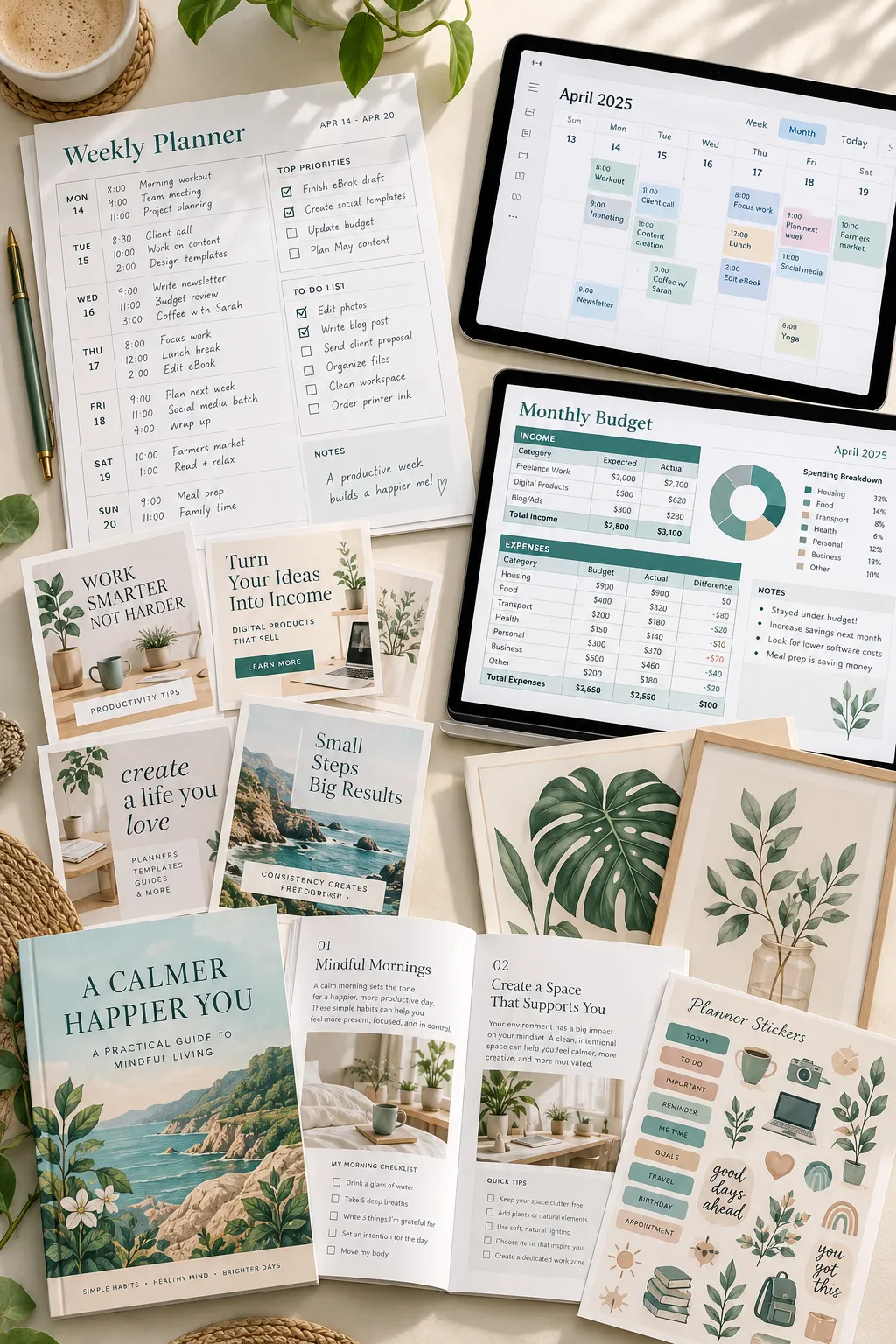
Most people hear the words “digital product” and assume it takes coding skills or expensive software to make one. That’s not true. A printable grocery list, a budget spreadsheet, and a set of social media templates can all be digital products, even though they look completely different.
If you’ve been wondering what is a digital product, the simple answer is something created in a digital format that customers can download or access online. Nothing physical needs to arrive in the mail. Some products are printed at home, while others are used directly on a tablet, phone, or computer.
People buy these products for everyday reasons. They might want to organize their week, learn a new skill, decorate a room, or save time on a task they do often.
Of course, not every digital file is ready to sell. A useful product needs a clear purpose, readable content, and the right permissions for anything included in it. Selling platforms also have rules worth checking before you create a listing.
Here are ten familiar examples that show what digital products actually look like and who might buy them.
1. Printable Planners and Calendars
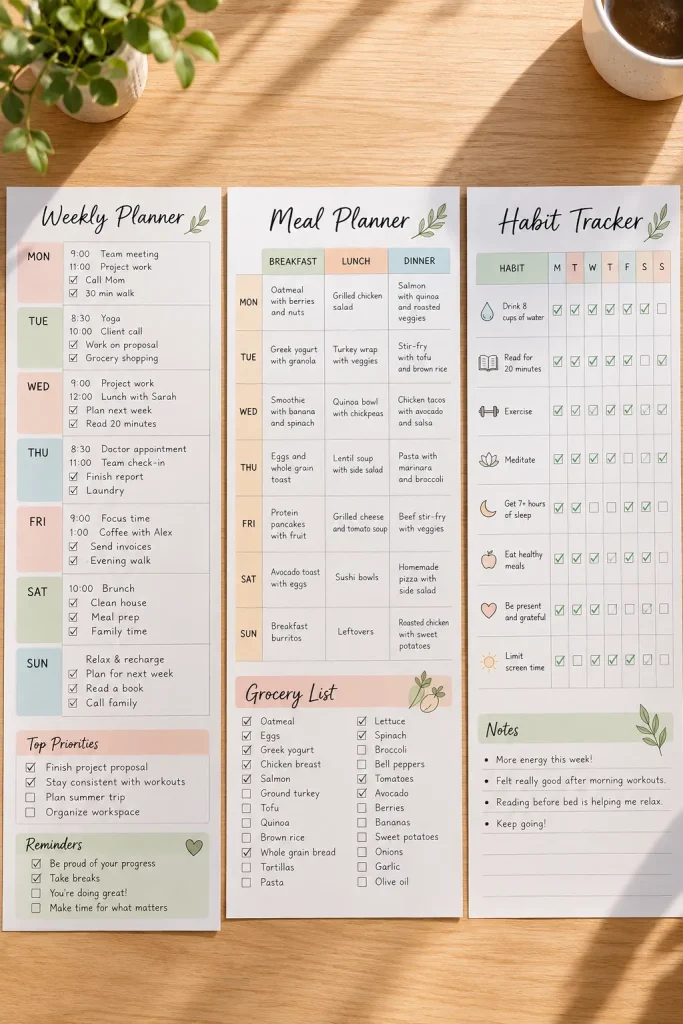
A printable planner is a digital file that someone downloads and prints on paper. It might be a weekly schedule, monthly calendar, meal planner, or habit tracker.
The customer receives the file, often as a PDF, instead of a physical notebook.
Who Buys Printable Planners?
Busy parents use meal planners to organize shopping. Students use weekly schedules to track assignments. People building new routines might prefer habit trackers they can stick on a refrigerator.
A good printable needs more than attractive colors. The boxes should be large enough to write in, and the page should print clearly.
Small detail that matters: Tell buyers which paper size the file is designed for.
2. Digital Planners for Tablets
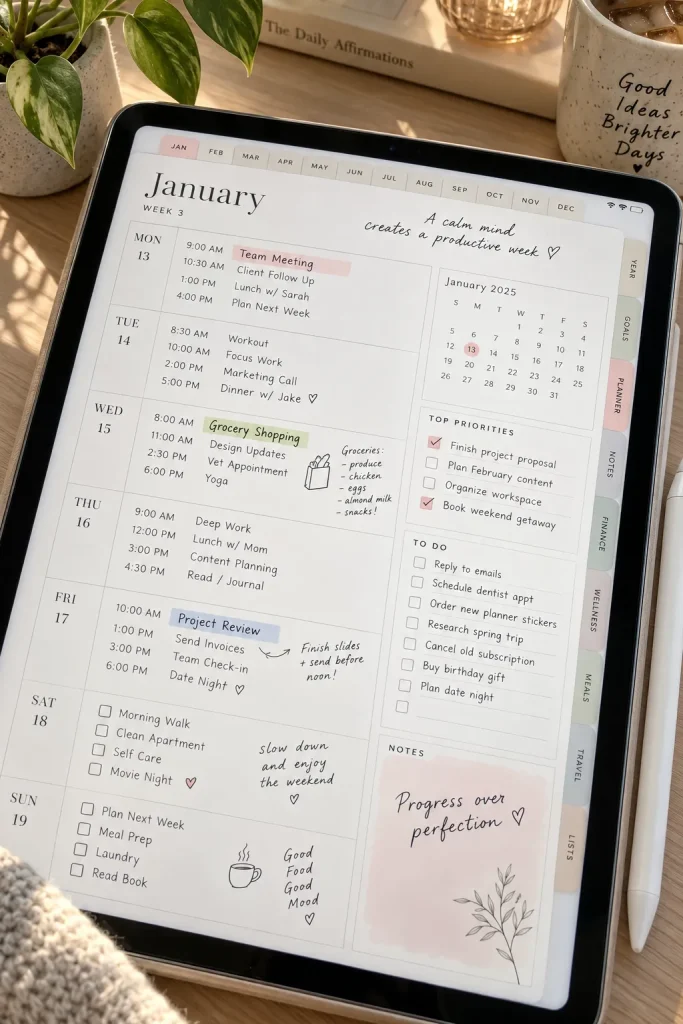
A tablet planner works a little differently from a printable planner. Instead of printing pages, customers open the planner in a compatible note-taking app and write directly on the screen.
These planners can include monthly calendars, weekly schedules, daily pages, and clickable tabs that move between sections.
Who Uses Tablet Planners?
People who already take notes on a tablet often like keeping their plans in the same place. A student, for example, can switch between a class schedule and an assignment tracker without carrying several notebooks.
Buyers need to know which apps and devices the planner supports. A PDF with clickable tabs is not the same as a planner that automatically sends reminders.
| Tablet Digital Planner | Printable Paper Planner |
|---|---|
| Used inside a compatible app | Used on printed paper |
| Write with a stylus or supported tools | Write with a pen or pencil |
| Check app compatibility and navigation | Check page size and printing needs |
3. Editable Canva Social Media Templates
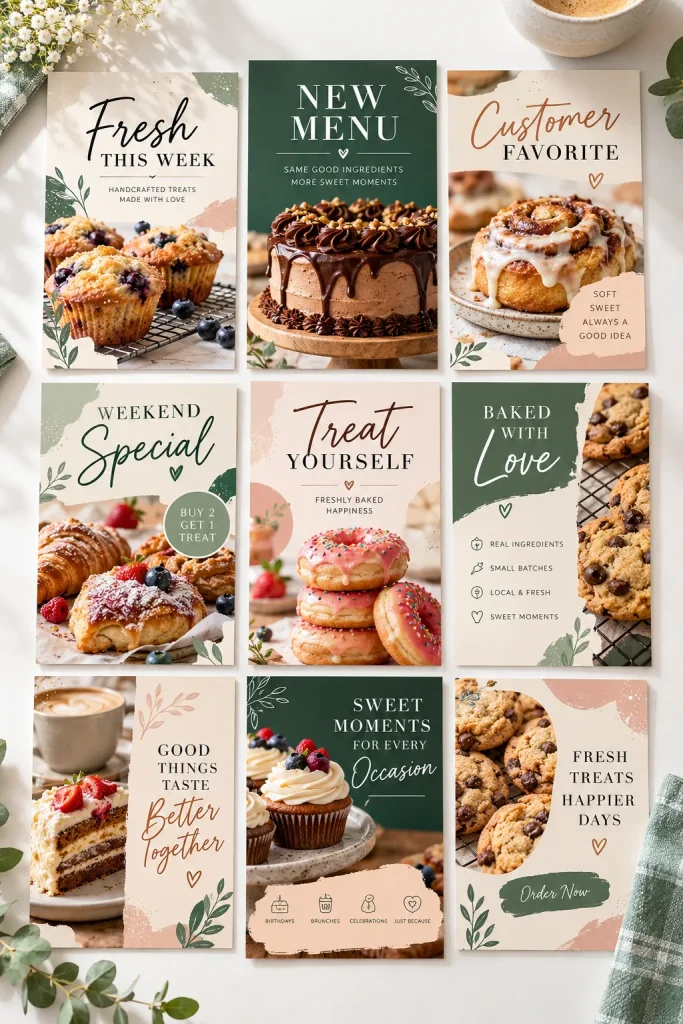
Small businesses often need social media posts but don’t want to design every graphic from scratch.
That’s where editable Canva templates come in. A seller creates layouts that buyers can customize with their own photos, colors, and words.
For example, a bakery might buy a collection containing a new product announcement, a customer review graphic, and a special offer post.
What Makes a Template Useful?
The layouts should work together while leaving room for different content. Buyers also need clear instructions explaining how to open and edit them.
Remember that selling a Canva template requires checking the current rules for any Canva content included. Not every element or design can be resold in every form.
A business creates every post separately.
Font sizes change, promotional details move around, and the posts have little in common.
A matching template pack gives each post a starting layout.
The owner changes the details while keeping colors, spacing, and headings consistent.
4. Budget Spreadsheets and Expense Trackers
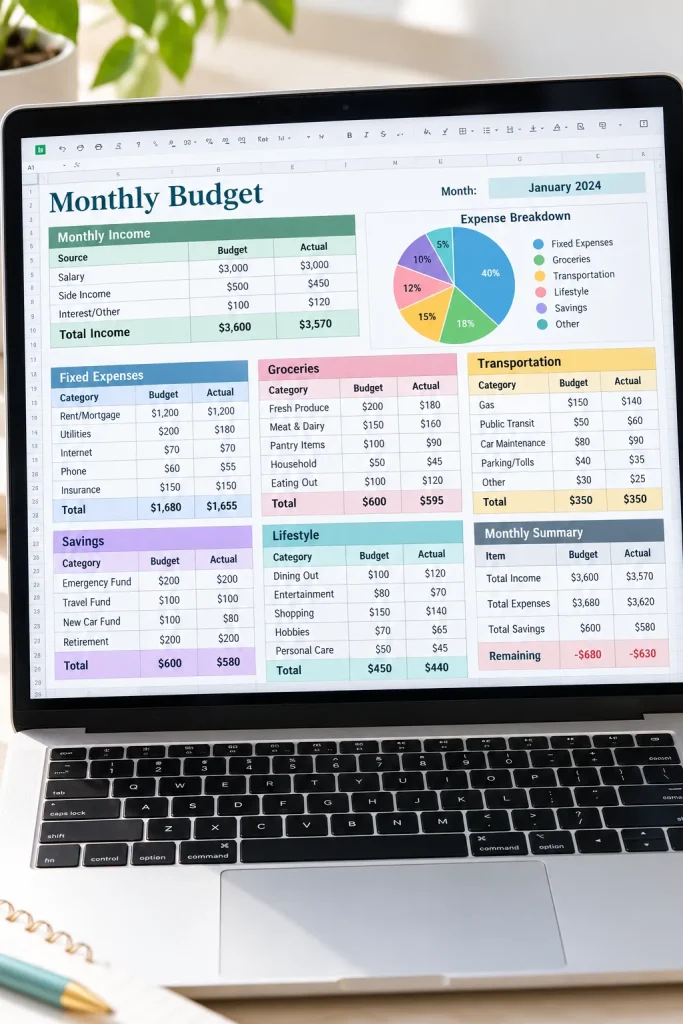
A budget spreadsheet helps people organize money information in rows, columns, and categories.
Someone might buy a monthly budget template that already has spaces for income, bills, groceries, transportation, and savings.
Unlike a plain printable worksheet, a spreadsheet can use formulas to calculate totals when the customer enters their own numbers.
Why Do People Buy These?
The main reason is convenience. Some people want a starting layout instead of building a spreadsheet themselves.
Google Sheets and Microsoft Excel are familiar tools for this type of product, but buyers need to know which format they will receive.
Before selling a tracker, test the formulas with sample numbers and make sure the instructions are easy to follow.
✅ Spreadsheet Quality Checklist
5. Ebooks and Short How-To Guides

An ebook does not need hundreds of pages to be useful. A short how-to guide can explain one task clearly, such as starting a balcony herb garden or organizing a family photo collection.
The customer usually receives a digital reading file, often a PDF, instead of a printed book.
Who Buys Short Guides?
People choose them when they want practical instructions gathered in one place. Someone learning a small skill may prefer a focused guide over a long book.
A useful guide has clear sections, steps that can be followed, and examples that support the topic. Include a contents page when it helps readers find things.
More pages are not automatically better.
6. Digital Workbooks and Activity Sheets
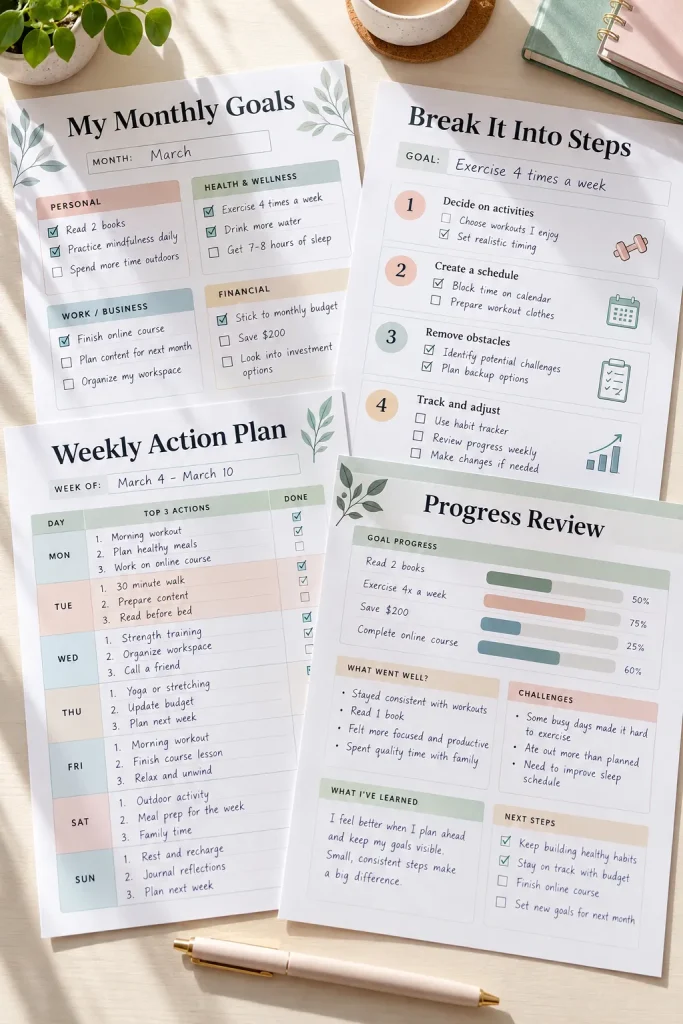
A workbook page might show a goal at the top, followed by questions, writing spaces, and a progress box at the bottom.
Unlike an ebook, a workbook asks the buyer to participate.
Digital workbooks can be filled in using a compatible app or printed, depending on how the file is made.
Who Uses These Pages?
A teacher might use reading worksheets, while someone setting personal goals could use reflection exercises. Parents may download activity packs for children.
The important part is giving one clear instruction for each task.
If the buyer cannot tell what to write, circle, or check, even an attractive workbook becomes hard to use.
How a Buyer Uses a Workbook
Start with a clear task. Read the question or exercise at the top of the page.
Complete the activity. Write an answer, mark a checklist, or finish a practice exercise.
Review the result. Check completed pages and identify what to practice or do next.
7. Printable Wall Art and Digital Prints

A print file needs to look good on paper, not just on a screen.
Printable wall art is artwork that a customer downloads and prints at home or through a print shop. The buyer receives files, not frames or finished posters.
Who Buys Printable Art?
Someone updating a bedroom might choose matching botanical prints. A renter might want artwork they can print in a size that fits a small frame.
Some buyers choose individual illustrations, while others prefer coordinating sets for a gallery wall.
Show the artwork itself, not only a room mockup. List the included file types and intended print sizes.
Most importantly, use artwork you own or have permission to sell.
Check that each file has enough detail for its intended print size.
Keep important artwork details away from edges that may be trimmed.
Do not assume a small image will print sharply at every poster size.
Do not use illustrations, characters, or photographs without suitable rights.
8. Presentation Slide Templates
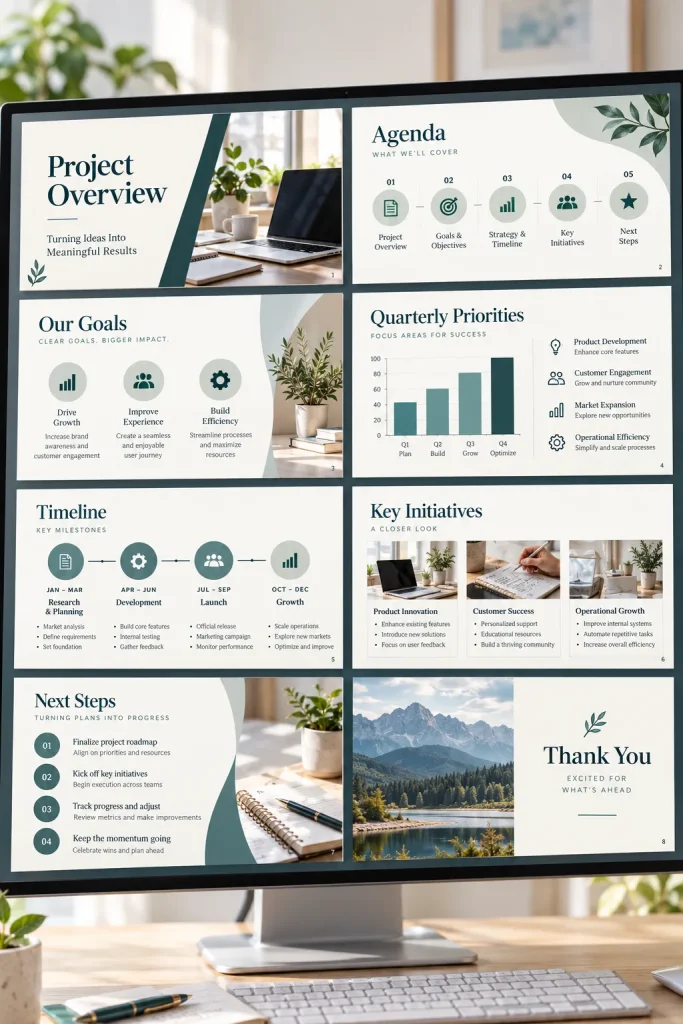
A teacher preparing a lesson may need a title slide, a clear chart, and a short summary. Building all of those from a blank screen takes time.
Presentation templates provide ready-made layouts that buyers fill with their own words, images, and data.
They might use PowerPoint, Google Slides, or another supported presentation app, depending on the file.
Who Buys Slide Templates?
Teachers use them for lessons. Students use them for class presentations. Small business owners might need a simple pitch deck.
A useful pack includes different slide purposes, not ten copies of the same title layout.
Check that fonts, charts, and other parts work in the software the buyer is told to use.
💡 Quick Tip: Show What Buyers Can Edit
In your product preview, make it clear whether buyers can change:
✓ Headlines and body text
✓ Colors and photographs
✓ Charts, tables, and diagrams
Identify any fixed elements, special fonts, or software requirements before buyers download the template.
9. Photo Editing Presets

The same photograph can look warmer, brighter, or more muted when its editing settings change. A photo editing preset saves a group of those adjustments so a buyer can apply them in compatible software.
Who Buys Photo Editing Presets?
Photographers, bloggers, and content creators sometimes buy presets to give a group of photos a similar look. A food blogger might want warm tones for recipe photos, while a travel creator may prefer cooler colors.
A preset is not an automatic fix for every photo. Lighting and camera settings affect the result, so some pictures still need extra edits.
Sellers should show genuine before-and-after examples and tell buyers exactly which editing app and file format the preset supports.
A photo preset pack contains saved editing settings, not finished photographs or a personal editing service. Buyers apply the settings to their own images and adjust them when needed.
10. Digital Stickers and Icon Packs
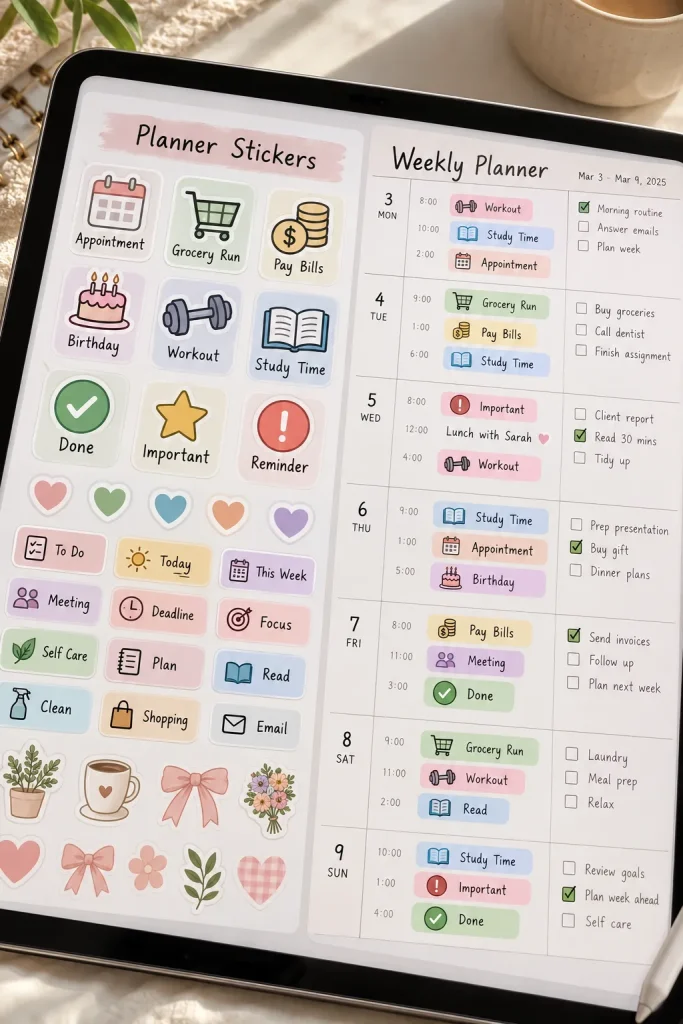
Small icons can make a digital planner easier to scan. A tiny checkmark can mark a finished task, while a shopping cart can flag grocery day.
Digital sticker packs are collections of images that buyers place onto compatible planner pages or digital notes. Some stickers are decorative. Others work as labels for appointments, chores, study time, and bills.
Who Buys Digital Sticker Packs?
Tablet planner users often buy these packs to avoid writing the same labels each week. A student might mark assignments with subject icons, while a parent uses reminders for school events.
Show the stickers at their intended size and explain the file format. A sticker that looks sharp when enlarged may be hard to read inside a small calendar box.
📦 What to Include in a Sticker Pack Preview
Start With One Useful Digital Product
Now that you’ve seen these examples, the question “what is a digital product?” has a practical answer. It’s a digital item people use to organize, learn, create, or decorate. Some files get printed, while others stay on a screen.
If you’re thinking about making one, choose a small problem you understand and build something that helps with it. A clear weekly planner or helpful worksheet is a sensible place to start. Check the latest rules for any software, artwork, and selling platform you plan to use.
A useful product doesn’t need dozens of features. It needs to do its job well.
Save this list to Pinterest so you can revisit these digital product examples when you’re ready to explore your first idea.